
Why Unzip X Stands Out as the Best Free ZIP Extraction Tool
When it comes to managing compressed files, Unzip X emerges as a standout choice for users across all platforms—Windows, Mac, Android, and iOS. This lightweight, freeware application is designed with simplicity and efficiency in mind, offering a seamless experience for opening, viewing, and extracting ZIP archives without the bloat of unnecessary features. Unlike many bloated file managers, Unzip X focuses solely on what matters: reliable, fast, and secure decompression.
One of the most compelling aspects of Unzip X is its intuitive interface. Even users with minimal technical experience can navigate the app effortlessly. Simply drag and drop your ZIP file into the window, and the tool instantly displays the contents. You can preview files, skip unwanted items, rename them on the fly, or extract them to a custom folder with just a few clicks. The absence of an in-app editor or preview feature for content within archives is a minor trade-off, but it keeps the software lean and responsive.
For advanced users, Unzip X delivers powerful command-line options that elevate its functionality. Whether you're automating tasks or working in batch mode, options like -c (specify extraction path), -r (recursive extraction), -s (skip existing files), and -t (extract by file extension) provide granular control. These features make Unzip X not just a tool for casual users, but a trusted companion for developers, IT professionals, and content managers who handle large volumes of archives regularly.
Security is another strong suit. Unzip X performs integrity checks during extraction and supports password-protected ZIP files, ensuring your data remains protected. With no ads, no telemetry, and no hidden costs, this free software is a refreshing alternative to commercial tools. If you're looking for a dependable, lightweight, and secure way to manage ZIP files, Unzip X is an excellent download option for any modern device.
Advanced Features That Make Unzip X a Power User’s Dream
While Unzip X shines in simplicity, it doesn’t compromise on power. Its robust set of command-line features transforms it from a basic ZIP opener into a versatile file management tool capable of handling complex extraction tasks. Whether you're organizing a project archive or automating file workflows, Unzip X gives you the control you need without the complexity of third-party tools.
One of the most useful features is the -r option, which enables recursive extraction—perfect for deeply nested ZIP files with multiple subdirectories. This ensures that no file is left behind, even in complex archive structures. Similarly, the -t flag allows you to extract only files with a specific extension (e.g., .jpg or .pdf), which is ideal when you only need certain types of files from a large archive. This selective extraction saves time and disk space.
For users managing large or frequently updated archives, the -i (modified after date) and -v (version-specific) options are game-changers. These allow you to extract only the files that meet your criteria—such as the latest versions of software packages or recently updated documents—without manually sifting through hundreds of files. The -k option, which filters files by keyword in the filename, is another smart addition, especially for developers or researchers dealing with project-specific files.
Additionally, the -f flag forces extraction even if a file already exists, which is useful when you want to overwrite outdated versions. Meanwhile, -s prevents accidental overwrites by skipping existing files, preserving your current work. The -x option lets you exclude specific files or folders, while -z extracts only files above a certain size—ideal for isolating large media files or backups.
These advanced features aren’t just technical gimmicks; they’re practical tools that streamline workflows. Whether you're a student organizing research materials, a designer managing project assets, or a system administrator deploying updates, Unzip X adapts to your needs with precision and speed.
How to Install and Use Unzip X on Windows, Mac, Android & iOS
Getting started with Unzip X is quick and straightforward, regardless of your operating system. The software is available as a free download for Windows, Mac, Android, and iOS, making it accessible to users across devices. Here’s a step-by-step guide to help you install and begin using the tool effectively.
For Windows: Visit the official website and download the .exe installer. Run the file, follow the on-screen prompts, and choose your preferred installation location. Once installed, launch Unzip X from the Start menu. You can either drag and drop ZIP files directly into the app window or use the “Open” button to browse your files.
For Mac: Download the .dmg file from the official site. Open the disk image, drag the Unzip X app into your Applications folder, and launch it. The app may prompt you to confirm the opening—click “Open” to proceed. The interface is identical to the Windows version, ensuring a consistent experience.
For Android: Head to the Google Play Store and search for “Unzip X.” Install the app, and it will appear on your home screen. Tap to open, and you’ll see a file browser. Navigate to your ZIP file, tap it, and choose your extraction destination.
For iOS: Search for “Unzip X” in the App Store. Download and install the app. Upon first launch, it will request access to your Files app. Grant permission, then browse to your ZIP file and extract it with a single tap.
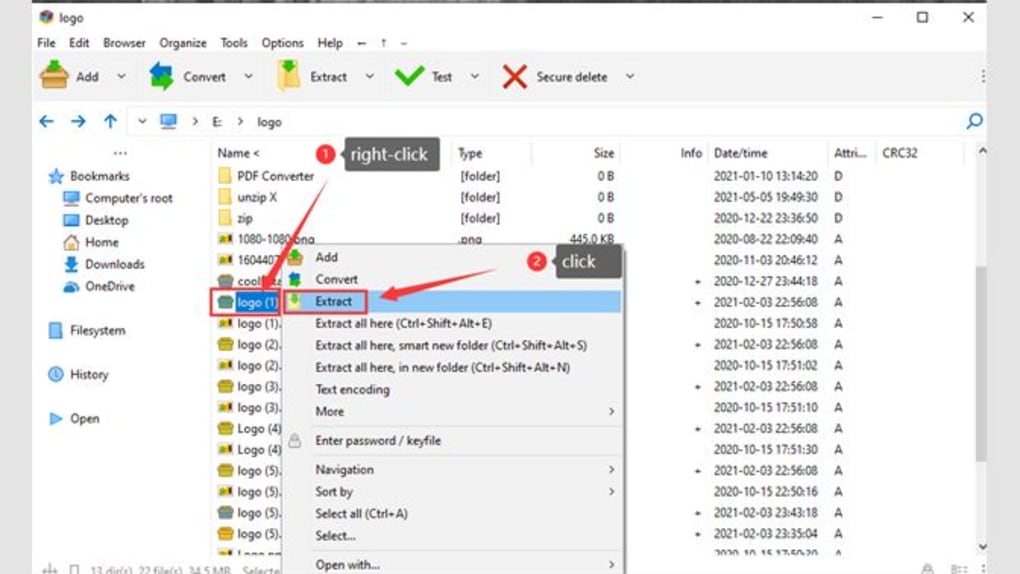
Once open, the interface displays all files inside the archive. Use the checkboxes to select specific files, then click “Extract” and choose a folder. You can also use the command-line interface for advanced users. Simply open a terminal or command prompt, navigate to the Unzip X directory, and run commands like unzipx -r -t .pdf archive.zip to extract all PDFs recursively.
Pros and Cons: Is Unzip X Right for You?
- Pros:
- Lightweight and fast performance
- Free to download and use with no ads
- Supports password-protected ZIP files
- Advanced command-line options for power users
- Available on Windows, Mac, Android, and iOS
- Secure extraction with integrity checks
- Intuitive interface for beginners
- Selective extraction by extension, size, date, or keyword
- Recursive and skip-when-existing options for smarter workflows
- Cons:
- No built-in file preview or editor
- Limited GUI customization
- Command-line features may be intimidating for absolute beginners
- No built-in compression or archiving functionality
- Minimal documentation for advanced options
Frequently Asked Questions (FAQ)
Is Unzip X free to use?
Yes, Unzip X is completely free to download and use. There are no hidden costs, subscriptions, or premium features. It’s a freeware tool designed to provide reliable ZIP extraction without any financial barrier.
Can I use Unzip X on my Mac and iPhone?
Absolutely. Unzip X is available for Mac (via .dmg installer) and iOS (via the App Store). It works seamlessly across Apple devices, allowing you to extract ZIP files directly from your iPhone or iPad.
Does Unzip X support password-protected ZIP files?
Yes, Unzip X supports password-protected ZIP archives. When you attempt to extract such a file, the app will prompt you to enter the password before proceeding.
Can I extract only specific files from a ZIP archive?
Yes, you can extract specific files using the built-in filters. Use the -t option to extract by file extension, -z for size-based extraction, -i for date-based filtering, and -k for keyword matching.
Is Unzip X safe to download?
Yes, Unzip X is safe and secure. It’s developed by a reputable team and does not contain malware, spyware, or tracking software. Always download from the official website to ensure authenticity.
Final Verdict: Why You Should Download Unzip X Today
Unzip X delivers a powerful yet simple solution for anyone who regularly works with ZIP files. Whether you're a student, professional, or casual user, this free tool offers speed, security, and flexibility across all major platforms. Its clean interface makes it beginner-friendly, while its advanced command-line features satisfy power users who demand precision.
With no ads, no fees, and a strong focus on performance, Unzip X is one of the best free file extraction tools available. It’s ideal for managing large archives, automating workflows, or quickly accessing essential files without the overhead of complex software.
Ready to simplify your file management? Download Unzip X now and experience fast, secure, and hassle-free ZIP extraction on Windows, Mac, Android, or iOS.







